Auth & middlewares
There are two ways to shape a request before it goes out (and inspect what comes back):
- Declarative auth: pick bearer or API key, point it at a variable. No code.
- Scripts: TypeScript functions API Craft runs in a sandbox: custom auth (compute a
token dynamically) and middlewares (
before/afterhooks that mutate the request or the response).
Scripts share one small typed SDK and run inside the app: there is nothing to install to run them. See The script SDK below for editor autocomplete.
Declarative auth
API Craft supports two auth types out of the box: bearer tokens and API keys. Auth can be
set as an API-wide default (merged into new requests) or overridden on an individual instance. Use
{{variables}} so the actual secret comes from an environment,
never the committed file.
API defaults
The first import of a spec sets the default from its securitySchemes, at the API level or
on the resources and operations that differ from the rest (see
what the first import sets up).
Set or change a default yourself and it applies when creating new requests:
# Bearer token
craftr api set auth bearer "{{apiKey}}" -a petstore-api

# API key (header or query). Petstore reads the `api_key` header
craftr api set auth api-key --in header --name api_key --value "{{apiKey}}" -a petstore-api

# Clear it
craftr api unset auth -a petstore-api
You can do the same in the app, in the Config tab of an API, a resource, or an operation; each level overrides the one above it.
Per-request auth
An instance's auth field overrides the default. In the request editor's Auth tab, pick
the type and reference a variable for the secret.
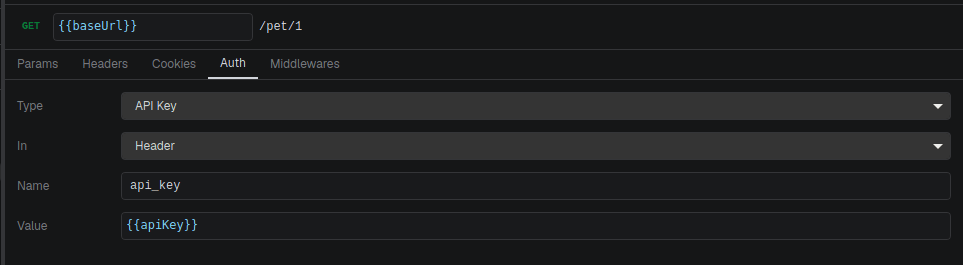
On disk:
{ "type": "bearer", "token": "{{apiKey}}" }
{ "type": "apiKey", "in": "header", "name": "api_key", "value": "{{apiKey}}" }
The secret variable (apiKey) is declared in the environment schema as secret: true, so
its value lives in the gitignored *.secrets.env file.
Custom auth
When a static or {{variable}} token isn't enough (you need to call a login endpoint, sign a
request, or refresh a credential), set the auth type to custom and point it at a script.
The script is an exported function in the API's middlewares/ folder. It receives the request
before it's sent and mutates it in place:
// apis/petstore-api/middlewares/petstore-auth.ts
import type { BeforeRequestContext } from '@apicrafthq/script-sdk';

export async function fetchToken(ctx: BeforeRequestContext) {
  let token = await ctx.cache.get<string>('token');
  if (!token) {
    const res = await ctx.http.post('https://petstore.example/auth', {
      body: { key: ctx.var('apiKey') },
    });
    token = (res.body as { token: string }).token;
    await ctx.cache.set('token', token);
  }
  ctx.request.headers['Authorization'] = `Bearer ${token}`;
}
On disk the request references it by name and export:
{ "type": "custom", "ref": { "name": "petstore-auth", "exportName": "fetchToken" } }
name is the file (without .ts), exportName the exported function inside it; they are
independent, so one file can hold several auth or middleware functions.
The context gives you ctx.var() to read the environment, ctx.http for auxiliary calls,
ctx.cache for a persistent key/value store shared across the project's scripts, and
ctx.logger for output. Full types are in The script SDK.
A custom-auth function can declare configurable options the same way a
middleware does; the values are stored in ref.options.
Middlewares
A middleware is a hook in the request pipeline:
beforeruns before the request is sent. Mutatectx.request(method, url, headers, query, body) in place.afterruns once the response is back.ctx.requestis read-only; mutatectx.response(status, statusText, headers, body).
Like custom auth, middlewares are exported functions living in the API's middlewares/ folder;
one file can export several:
// apis/petstore-api/middlewares/tracing.ts
import type { BeforeRequestContext, AfterResponseContext } from '@apicrafthq/script-sdk';

export async function addRequestId(ctx: BeforeRequestContext) {
  ctx.request.headers['X-Request-Id'] = crypto.randomUUID();
}

export async function warnOnServerError(ctx: AfterResponseContext) {
  if (ctx.response.status >= 500) {
    ctx.logger.warn(`Petstore returned ${ctx.response.status} for ${ctx.request.url}`);
  }
}
Attaching middlewares
A request carries an ordered list per phase. On disk:
{
  "middlewares": {
    "before": [{ "name": "tracing", "exportName": "addRequestId" }],
    "after": [{ "name": "tracing", "exportName": "warnOnServerError" }]
  }
}
In the app, use the middleware chain editors. You can attach a chain at four scopes:
- API / resource / operation defaults: seeded into new request instances (same model as auth defaults). Editing a default doesn't retro-fit existing instances.
- Request: the specific instance's own chain.
Within a phase, middlewares run top to bottom in the listed order; reorder them in the editor. The same function can appear once per phase; two different exports of the same file can share a chain.
Middleware options
A middleware or custom-auth function can declare options: a small form API Craft renders under the function in the chain editor (and in the Auth tab for custom auth). The values you pick are saved on the attached ref, so the same function can run with different settings in different chains.
Export an options constant from the script file, keyed by exported function name. Each entry is
a map of properties written as a subset of JSON Schema:
// apis/petstore-api/middlewares/filters.ts
import type { AfterResponseContext, InferOptions, OptionsMap } from '@apicrafthq/script-sdk';

export const options = {
  byStatus: {
    status: {
      type: 'integer',
      title: 'Expected status',
      enum: [200, 201, 204, 400, 401, 403, 404, 409, 500],
      default: 200,
      required: true,
    },
    onMismatch: {
      type: 'string',
      title: 'On mismatch',
      description: 'Fail the request or only log a warning',
      enum: ['fail', 'warn'],
      default: 'fail',
    },
  },
} as const satisfies OptionsMap;

export async function byStatus(ctx: AfterResponseContext<InferOptions<typeof options.byStatus>>) {
  const { status, onMismatch } = ctx.options;
  if (ctx.response.status === status) return;

  const message = `Expected ${status}, got ${ctx.response.status} for ${ctx.request.url}`;
  if (onMismatch === 'warn') {
    ctx.logger.warn(message);
    return;
  }
  throw new Error(message);
}
Per property:
| Key | Purpose |
|---|---|
type | string, integer, number or boolean. |
enum | Allowed values; rendered as a select. Not allowed on booleans. |
default | Written into the ref when the function is attached, and applied at run time when the key is missing. |
required | true makes the key mandatory. Without a default, a missing value blocks the request. |
title, description | Label and help text shown in the form. |
InferOptions derives the ctx.options type from the declaration: a key with required: true
or a default is always present, the others are optional. ctx.options is frozen.
Rules:
optionsis optional. A function without an entry gets an emptyctx.optionsand no form.- A key in
optionsthat matches no exported function is reported as a warning in the chain editor and ignored. An entry that doesn't fit the subset above is reported too; the function stays usable, without a form. - Values are validated before the function runs: a wrong type, a value outside the enum, or a
missing required key without default fails the request with
INVALID_MIDDLEWARE_OPTIONS, naming the field. Nothing is silently ignored. The app disables Send while a chain has invalid options. - Keys present on the ref but absent from the schema are kept as they are and flagged in the form; API Craft never drops data you wrote by hand.
- Reading the schema means loading the script, so the form only appears in a trusted project. Until then the editor offers to approve it.
On disk, the chosen values live in options on the ref:
{
  "middlewares": {
    "after": [
      { "name": "filters", "exportName": "byStatus", "options": { "status": 404, "onMismatch": "warn" } }
    ]
  }
}
Options declared on API, resource or operation defaults are copied into new instances with the
chain, the most specific level winning. The resolved values show up in the run trace
(craftr req run --verbose, or the Logs tab in the app).
Overriding middlewares from the CLI
craftr req run can change the request's chain for one invocation, without touching the
file. Three forms, all repeatable:
craftr req run Orders/list -e dev \
  --disable-middleware tracing \
  --enable-middleware filters#byStatus \
  --set middleware.filters#byStatus.status=404 \
  --set middleware.filters#byStatus.onMismatch=warn
- A target is
name(every export of that file present in the chain, both phases) orname#export(one function). A target that isn't in the request's chain is an error; you can't attach a middleware this way. --set middleware.<target>.<key>=<value>overrides one option and enables the target, like--setdoes for a disabled parameter. Values are parsed like--set body.*:404is a number,truea boolean,"5"a string. Other options keep their saved value or default, and the result is validated against the schema like any run.- Explicit flags win:
--disable-middlewarebeats a--set middleware.*on the same target,--enable-middlewarebeats--disable-middleware. Asking for the state a middleware already has is a no-op.
With shell completion installed, --disable-middleware only proposes middlewares
that are currently enabled, --enable-middleware only the disabled ones (both reflect the flags
already typed on the line), and --set middleware.<target>. lists the option keys from the
schema when the project is trusted or --trust is on the line.
Execution rules
- Each middleware has a 5-second timeout. Exceeding it fails the request.
- A middleware that throws aborts the whole request: a
beforehook stops it from being sent; anafterhook fails the run after the response arrived. - Scripts only run in a trusted project. The first time you run a request that uses a script, API Craft asks you to approve the project.
Middlewares and custom auth run real code from the project. Only approve projects you trust; approval lets every script in the project execute.
The script SDK
Custom auth and middlewares import their types from @apicrafthq/script-sdk. This package is
types only: the runtime is built into API Craft, so you don't need to install anything to
run scripts. Install it only for editor autocomplete and type-checking while you write them.
The context passed to every script:
| Member | Available in | Purpose |
|---|---|---|
ctx.var(name) | all | Read a variable from the active environment. Typed from the env schema. |
ctx.http | all | HTTP client (get/post/…) for auxiliary calls: login, signing, polling. |
ctx.cache | all | Persistent key/value store, shared across the project's scripts. |
ctx.logger | all | debug/info/warn/error. Use this; console is not allowed. |
ctx.request | before / auth | The outgoing request. Mutable in before hooks. |
ctx.response | after | The response. Mutable in after hooks. |
ctx.options | before / after / auth | The function's declared options, validated and frozen. Empty when none are declared. |
The SDK also exports OptionSchema, OptionsMap and InferOptions for declaring options.
console is rejected at load time: a script that calls console.log won't run. Use
ctx.logger instead.
Installing the types
When you create a script, API Craft generates a tsconfig.json and a .api-craft/env.d.ts (which
types ctx.var() from your environment schema) inside the API folder. Both are gitignored; they
are local editor tooling, not part of the project. Add the SDK the same way: as a dev-only
dependency, wherever your editor will find it.
TypeScript projects: add it as a dev dependency at the repo root:
npm install -D @apicrafthq/script-sdk
Your existing node_modules is above the API folder, so the editor resolves it with no extra
setup.
Everything else (a non-JS backend, or a standalone API Craft project): install it in the
apis/ directory so a stray package.json doesn't land at your repo root:
cd apis
npm install -D @apicrafthq/script-sdk
One install under apis/ covers every API beneath it. Gitignore the tooling so it stays local:
# apis/.gitignore
node_modules/
package.json
package-lock.json
This is purely a developer-experience step. Middlewares and custom auth run fine with nothing installed; the SDK is bundled into API Craft. Skip it and you only lose autocomplete.
Next
Chain requests together and assert on responses in writing workflows.