Importing a spec
Importing turns an OpenAPI spec into resources and operations. Re-importing a newer version diffs it against your current spec and shows the impact before changing anything.
First import
In the app, the New API wizard imports the spec and walks you through the mapping. From the CLI:
craftr schema import https://petstore3.swagger.io/api/v3/openapi.json -a petstore-api
The source can be a URL or a file path; omit it to read from a saved source or piped stdin.
The source you pass is saved in api.json (specSource) for future re-imports.
What the first import sets up
The first import of an API also reads the spec's servers and securitySchemes and writes
the environment and auth configuration you would otherwise type by hand. Later re-imports
never touch any of it: it is a one-time seed, and everything it writes is a plain file you can
edit.
Environments. One per entry in servers, named after the server's description, or its
host when there is none and the URL is absolute, falling back to server-1, server-2.
The level (local, staging, production) is guessed from the URL
and description; the first server defaults to production. The environment gets baseUrl
set to the server URL, and every {variable} in a server URL becomes an environment variable
of its own, with the server's default as its value. A relative server URL is resolved against
the spec's URL when it was imported from one. When the spec declares no server, the default
local environment is kept as is.
Variables. baseUrl is declared in schema.json, and the API's base URL is set to
{{baseUrl}} unless you had already typed one. Each security scheme in use declares one
secret variable: bearerToken for HTTP bearer, accessToken for OAuth2 and OpenID
Connect, apiKey for API keys. Secrets are declared but left empty: fill them in each
environment's .secrets.env.
Auth. Each operation's first security alternative is what counts. The requirement shared
by most operations becomes the API default; a resource whose operations all agree on a
different one carries it at the resource level; anything else lands on the operation itself.
An API key sent as a cookie becomes a default cookie on the API or resource, since an
operation has no cookie defaults.
Per-operation servers. An operation or path with its own servers gets a dedicated
variable (<host>BaseUrl), set in every environment and placed at the same narrowest level.
The wizard ends on a Set up from the spec summary of all of the above; the CLI prints the
same as a seeded block in its JSON report. Anything the import could not translate is
listed as a warning:
| Warning | Meaning |
|---|---|
unsupported-scheme | HTTP schemes other than bearer, API keys outside header/query/cookie, or a scheme behind an unresolved $ref. Configure that auth by hand. |
security-and-ignored | An alternative required several schemes at once; only the first was applied. |
unsupported-placement | A cookie API key was needed on a single operation, which has no cookie defaults. Set it on the resource or the request. |
relative-server-url | The server URL is relative and the spec came from a file, so there is nothing to resolve it against. Set baseUrl yourself. |
The diff report
Before applying, API Craft reports what will change, in four groups:
- Operation changes:
added,removed,modified, and anything that landsunmapped. Added operations are auto-mapped where the heuristics can; removed ones are flagged (and noted if a request or rule references them). - Override outcomes: how your edits interact with the new spec:
noChange,caughtUp(the source now matches your override, so it can be dropped),conflicts(the field changed in both), andorphans(your override targets something that's gone). - Defined-operation conflicts: a locally-defined operation that now exists in the source spec.
- Orphan rules: mapping rules whose match no longer resolves.
On a terminal the import is interactive: you resolve each item, then confirm. Pass --yes
to skip the confirmation (required for non-interactive use), and preview without importing
with:
craftr schema diff -a petstore-api          # against the saved source
craftr schema diff ./new-spec.yaml -a petstore-api
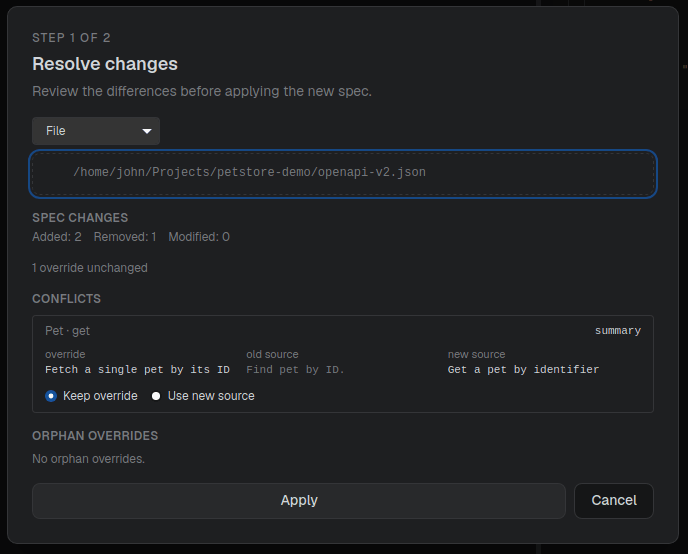
Resolving the diff
| Situation | Your choices |
|---|---|
| Override conflict | keep your override · use the new source value · edit to a new value |
| Override orphan | keep · remove · remap to another field |
| Defined-op now in spec | promote to mapped · keep as defined · rename |
| Orphan rule | keep · remove · remap |
| Source caught up | dropped automatically (toggle with --auto-clear-caught-up) |
Handling unmapped operations
Whatever the heuristics can't place lands as unmapped. Map or ignore it:
craftr schema unmapped -a petstore-api               # see what's unmapped
craftr schema map updatePetWithForm Pet updateWithForm -a petstore-api
craftr schema ignore uploadFile -a petstore-api
craftr schema map-all --default -a petstore-api      # bulk-map everything by heuristic
You can do the same visually from the schema sidebar in the app.
The diff always compares against the current spec.imported.json. Past versions live in your
git history; that's the record of how the spec changed over time.